


Microsoft 365 Copilot Cowork introduces agent-based workflows that execute multi-step tasks across your M365 environment. Learn how to deploy, govern, and maximize its impact.

Until now, people have mainly interacted with Microsoft 365 Copilot through prompts and responses. Pretty simple in hindsight, but also enough for many to improve productivity from drafting content, summarizing information, and searching across the M365 tenant.
Today, it’s time for another big burst in productivity. Microsoft is enabling the multitasking tooling of Anthropic’s Cowork inside the M365 ecosystem. Starting today, in Frontier tenants, Cowork will start to appear as an Agent for licensed M365 Copilot users.
This blog outlines an order of operations for IT leaders, then introduces the capabilities and controls available for Cowork.
Rollout Strategy for IT Leaders
The Cowork agent can plan and execute multiple sequential tasks on a user’s behalf, just like Claude Cowork can, however, since it’s operating inside M365, it has a different architecture and can be governed according to enterprise standards.
Here are a few considerations of when and to whom to roll this out.
- Set expectations cautiously. Anthropic released Cowork in January, and as of 3/30/26, continues to label Claude Cowork as a research preview. Microsoft has had Copilot Cowork running in private preview for long enough to release it as a “Frontier” feature.
- Determine whether to enable Anthropic’s models as a Microsoft subprocessor (especially if employing people in the EU). As a subprocessor, Anthropic operates under Microsoft’s contracts. This includes coverage under the Microsoft Data Protection Addendum (DPA) and Product Terms. In addition, the use of Anthropic models in M365 Copilot falls under Microsoft’s Enterprise Data Protection.
- Activate Frontier features to let Cowork appear in your tenant (subject to rollout and agent access settings).
- Limit the installation of Cowork (and other agents) to specific (groups of) people.
- Install Cowork so that it appears in the left-hand rail.
- At www.microsoft365.com
- Select “All Agents”
- In the search bar: type “Cowork”
- Cowork should pop up if your tenant (and your ID) are in Frontier.
- Start with some basic tests to build trust. Some examples of Cowork’s multistep capabilities are below.
- Measure efficacy. To measure Cowork’s efficacy, survey champions for their “Before Cowork” productivity metrics (and again 4 then 12 weeks “After” Cowork). See sample questions to “Survey a Pilot Group.”.
- Enable champions. Show early champions and/or IT + InfoSec how to install the agent.
- Prepare messaging. Begin to prep the “why” and “what to use when” messages for a broader audience. Encourage people to try Cowork instead of Copilot Chat, especially when they need a file (or multiple files) created.
- Validate retention. Observe the files that are created and how they’re stored and retained (in OneDrive).
- Iterate governance. Continue honing your governance guidelines, and sufficiently reduce the risk of oversharing. Even though Cowork runs in an M365 enclave, governance is a journey.


Key Capabilities of Copilot Cowork
Have you found yourself opening up multiple different Copilot chat windows to work on several conversations at once? That’s a thing of the past with Cowork. It supports structured, multistep instructions in parallel. Users can adjust execution on the fly, without pausing and restarting the process. It can produce multiple artifacts from a single request. As a result, complex prompts get faster results.
Initial Usage Scenarios
Out of the box, Copilot displays the following example capabilities, and an open text window that allows the user to provide any instruction.
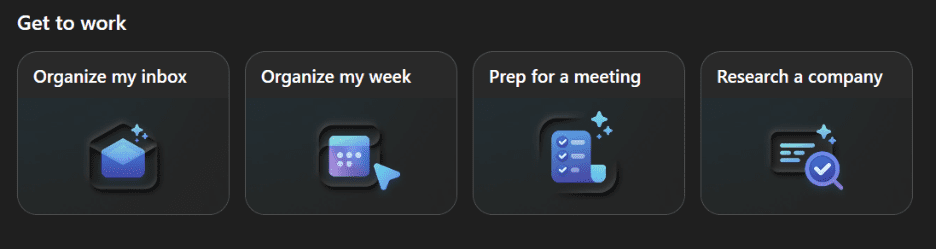
Clicking creates detailed prompts that you can read.
Findings from initial testing
- PowerPoint presentations and Word documents that are created are visually appealing. When created from Excel spreadsheets, they retain accuracy across apps.
- Organizes my inbox, finds some spam and newsletters, and offers to delete them, one at a time, or in bulk. Copilot does a nice job inferring which you might want to keep based on your role and what it knows about your work.
- You can queue up a second command during the first.
- Sessions continue running when the PC is off or sleeps (unless waiting on user approval). Such actions will continue only after consent is provided.
- Data classifications that are applied to files used by Cowork are also preserved in outputs.
When to Use Cowork vs Other Copilot Tools
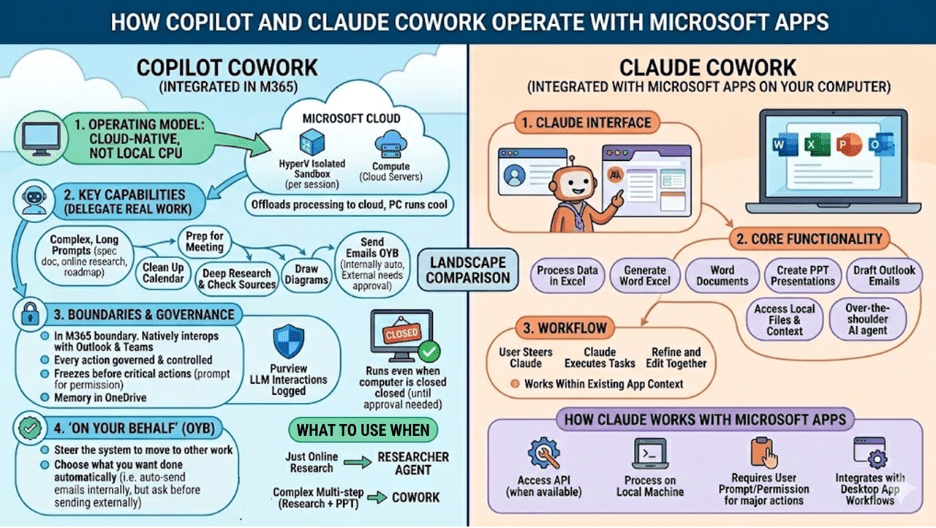
Cowork overlaps a bit with Copilot’s Researcher agent, and will likely take a minute for the layperson to grok what to do with it. Here’s an initial practical breakdown of the differences:
- The main Copilot interface is best for simple writing, retrieval, and search tasks.
- Researcher Agent is well-suited for external research tasks.
- Copilot Cowork is suited for workflows that result in structured deliverables.
Tasks that culminate in presentations, roadmaps, or decision artifacts align well with Cowork’s execution model.


Architecture
Upon release, Copilot Cowork operates entirely in the cloud, unlike Claude Cowork, which operates on the local device. With Copilot, the PC doesn’t even need to be on for Cowork to continue, as tasks are completed independently for the endpoint’s status. This is especially valuable for long-running tasks.
Each session is executed in a Microsoft-managed isolated compute/sandbox environment in the cloud.
Actions are performed in the context of the authenticated user and are logged through Microsoft Purview.
Integration with Microsoft 365
Copilot Cowork operates with Microsoft 365 services without a plugin. Systems that are automatically wired up include:
- Communication tools like Outlook and Teams.
- Content creation apps like Word, PowerPoint, and Excel.
- Copilot search capabilities.
- Microsoft Graph API access.
All activity occurs within the Microsoft 365 trust boundary. Endpoint DLP is not relied upon to enforce security or compliance requirements.
Extensibility Model
Copilot Cowork will support extensibility through:
- Skills.
- Model Context Protocol (MCP) servers.
- External system integration.
- Python-based logic execution.
Skills can include executable logic running inside the sandbox environment. This enables repeatable workflows that combine instructions and software execution.
Governance Controls
As usual, governance is a work in progress. One thing is for certain, running Cowork in Microsoft 365 provides far better options than running Claude Cowork outside of the M365 ecosystem– But nothing’s on by default.
At launch:
- The main governance “option” is to turn Cowork on/off for specific people.
- Cowork can eventually be activated by user, group, geography.
- There are separate extensibility controls and installation options for skills.
- All actions execute in the user’s security context and are logged.
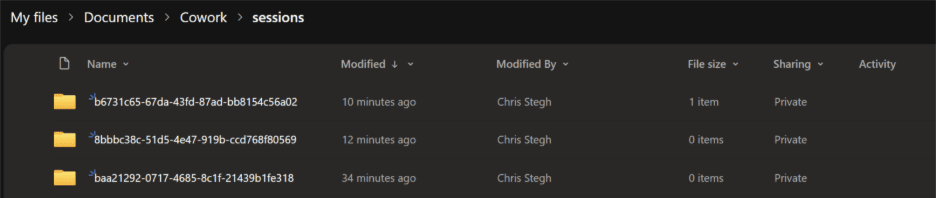
- Output is stored in dedicated OneDrive (rather nonsensical) folder structures.
- Sessions generate multiple files and subfolders.


Summary
Similar to using Anthropic’s Cowork, but automatically connects your work data within WorkIQ and the Microsoft 365 Graph. It’s more performant when running in the cloud compared to using PC resources.
Backed by enterprise governance tools like Purview and Defender, it’s another example of how power users (especially Claude fans) can get value from their $30 Copilot license, as soon as IT approves.
As people adopt agent-assisted workflows, we’re entering a new paradigm. Cowork offers the ability to assign work rather than a user having to guide the LLM through prompts and responses.
Cowork is a big step towards a new productivity level. And it’s another demonstration of Microsoft’s current strategy to offer model choice within M365 Copilot.
Refine Your Copilot Strategy
Unlock the full value of Microsoft 365 Copilot with a structured rollout and governance approach.