


Most organizations believe Defender for Cloud provides full protection once enabled. In reality, the free CSPM tier delivers visibility without context. Defender CSPM changes that by prioritizing risk through attack path analysis.

Most organizations I walk into tell me some version of the same thing. Defender for Cloud is already turned on, so they believe coverage is in place, and they’re right, it is turned on…
What they usually mean, though, is that the free Cloud Posture Security Management (CSPM) capability is running in the background. That’s where the misunderstanding starts, because what the free tooling is providing at that point is visibility, not understanding, and those are two very different things.
That gap is where the risk hides, and it usually isn’t obvious until you go looking for it.
The free CSPM tier gives you visibility into misconfigurations. Defender CSPM adds context by showing how those issues connect to real attack paths.
What the Free CSPM Tier Actually Does
Out of the box, Defender for Cloud gives you a baseline view into your environment. You get a Secure Score. You get a stream of recommendations driven by Azure Policy, and you get a general sense of where things are misconfigured.
That all sounds useful, and it is, to a point.
Key Takeaway: The free CSPM tier tells you what exists. It doesn’t tell you what matters or what to fix first.
Visibility Without Prioritization
You’ll know what exists, but not receive any help in understanding why it matters.
What I tend to see in the wild isn’t a lack of findings. It’s an overload of findings with no real prioritization.
Why Findings Don’t Drive Action
So, you end up with things like deprecated test environments that were used for a project six months ago, never properly decommissioned, and still sitting there with known vulnerabilities and no clear owner. They show up in recommendations, but no one feels responsible for acting on them.
At the same time, you’ll see users who were granted access to sensitive resources like Key Vaults during a project or a troubleshooting exercise, and that access never got revoked. Now you’ve got more privilege floating around than anyone is comfortable with, but it doesn’t feel urgent, because it’s just one more item in a lengthy list.
The free tier surfaces all of this without connecting it with context. It doesn’t tell you which of those issues creates a meaningful vector to something sensitive, and it doesn’t help you decide what to fix first.
As a result, teams end up staring at a backlog of things to do with no clear starting point, and that’s usually where momentum dies.

Where Defender CSPM Changes the Conversation
The shift when you move into the Defender CSPM tier is less about getting more data. It’s about finally getting context– because instead of looking at misconfigurations in isolation, you start to see how they relate to each other. That’s where things get uncomfortable in a useful way.
What Attack Path Analysis Changes
Attack path analysis is really the unlock here. You’re no longer looking at a misconfigured resource or an overprivileged identity on its own. You’re seeing how an attacker could realistically move through your environment by chaining those things together. That’s the moment where what used to feel like low priority suddenly becomes part of something very real.
Why This Matters: Risk doesn’t come from a single misconfiguration. It comes from how multiple issues and vulnerabilities can be chained together, allowing attackers to move through your environment with ease.
When Visibility Becomes Real Risk
I’ve had clients who were genuinely confident their perimeter controls had covered them. Firewalls were in place. Monitoring was in place. Everything looked solid when viewed through that traditional lens. Then we enabled Defender CSPM and started looking at attack paths. The number of viable routes through their environment was not small. That’s not a comfortable realization, but it’s an important one.
That’s usually when the conversation shifts. It moves from “we have tools in place” to “we may not actually understand our exposure as well as we thought we did,” and that’s a very different place to operate from.
What Most Teams Miss: Traditional controls can look solid in isolation, but still leave multiple viable paths through the environment.
Why You Should Actually Turn It On
This isn’t about whether you want additional features. It’s about whether you trust your current understanding of risk enough to bet on it.
When the Gaps Start to Show
If you’re operating across multiple subscriptions, trying to piece together a coherent view of risk from different tools, or heading into an audit hoping nothing unexpected shows up, there’s already some level of uncertainty there– Whether it’s being acknowledged or not.
The same thing shows up when you start expanding into more data-heavy workloads or layering in AI. Those changes tend to increase exposure in ways that aren’t immediately visible through basic posture checks– That’s where the gap between visibility and understanding starts to matter a lot more.
Usually, this isn’t enabled unless someone actively decides to enhance their risk model. It gets turned on because something forced the issue. An incident. An audit finding. Or just the realization that the current view isn’t holding up under scrutiny.
If This Sounds Familiar: You likely have visibility, but not a clear understanding of your actual exposure.

How to Enable the Free CSPM Tier
If there’s any question about whether the baseline is properly in place, it’s worth starting there and confirming it instead of assuming it.
- Go into the Azure portal
- Navigate to Defender for Cloud
- Open Environment settings
- Then select the subscription you’re working with
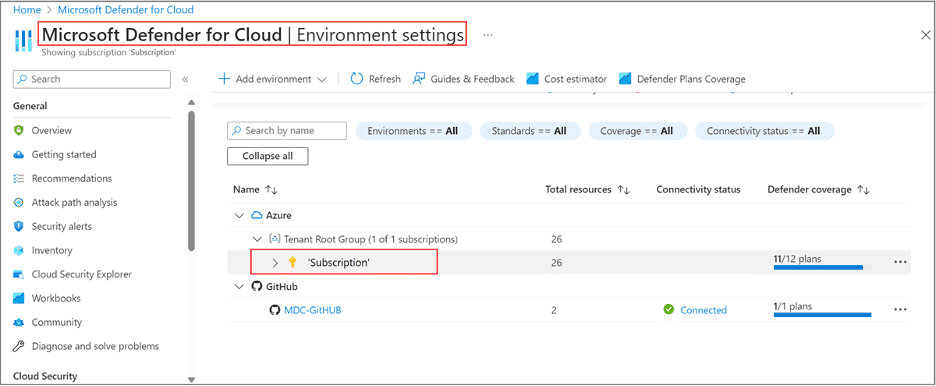
From there:
- Make sure CSPM is enabled
- Go to Defender plans
Once that’s done, don’t stop there:
- Check that Secure Score is populating
- Look at the recommendations
- Make sure what you’re seeing reflects your environment and not just a partial or stale view
At that point, you have the necessary visibility, but it’s still only the first step.
Moving to Defender CSPM
If you stop at the free tier, what you end up with is a list, and lists are easy to ignore over time, especially when they keep growing, and nothing is clearly telling you what matters most.
When you move to Defender CSPM, you start to get context layered on top of that list. That’s what allows you to make decisions. The process itself is straightforward.
- Stay within Defender for Cloud
- Go back into Environment settings
- Select your subscription
- Locate the CSPM plan
- Review the pricing by hitting the details link (pricing varies)
- Toggle the switch to On
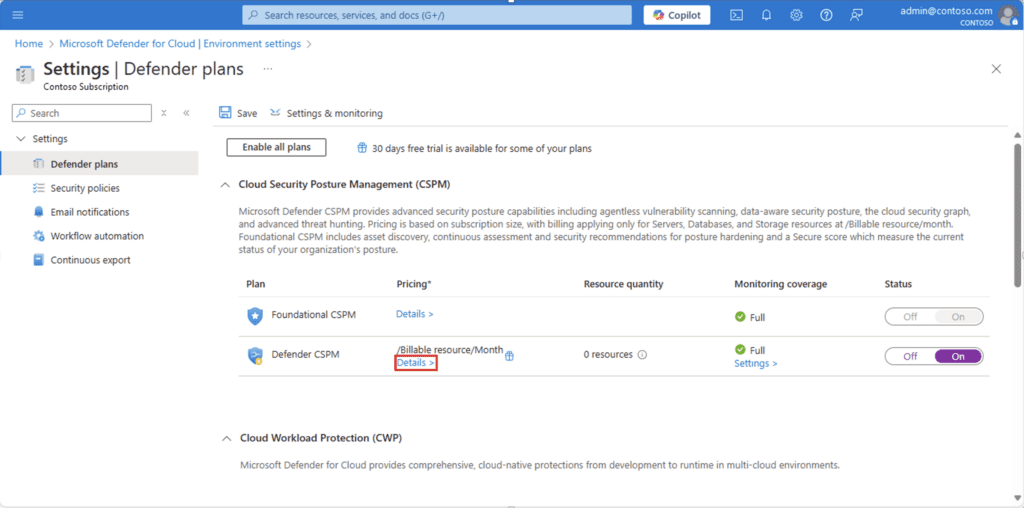
From there, it doesn’t take long before you start to see the difference in how the environment is presented. Instead of isolated issues, you begin to see contextualized risk flows. That’s what makes the platform operationally useful rather than just informational.
Below, we can see what a dashboard looks like once Defender CSPM is enabled.
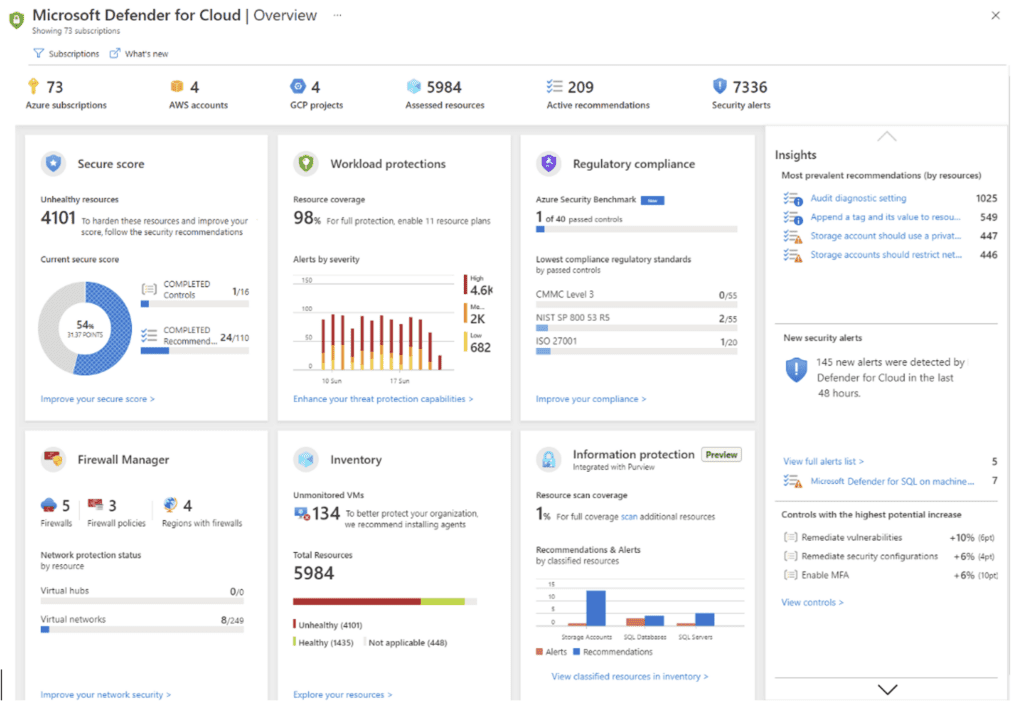

Don’t Stop at CSPM: Start with Defender for Storage
Once you start getting a handle on posture, the next question usually becomes where to focus from a workload protection standpoint. If you’re looking for something that delivers value quickly without a lot of overhead, Defender for Storage is usually where I point people.
Why Start at the Data Layer
The reason is simple. It operates at the data layer. And that’s where a lot of meaningful activity happens without much visibility. You start to see things like:
- Unusual access patterns to storage accounts
- Misuse of Shared Access Signature (SAS) tokens
- Malware uploaded into blob storage
All of which tend to fly under the radar until something is actively looking for them.
What makes it practical is that you don’t have to deploy agents or go through a heavy implementation cycle. You enable it and start getting signals relatively quickly, and that matters because most teams don’t have the capacity to take on everything at once.
From there, you can expand into servers, SQL, and containers in a more controlled way. Trying to light everything up on day one usually just creates noise and slows adoption.
Why This Is a Good Starting Point: No agents. Minimal setup. Immediate visibility into data-layer activity that’s often overlooked.
Final Thought
Turning on Defender for Cloud is easy. That’s part of the problem because it creates a sense that something meaningful has been done, when what you have at that point is a starting position.
Understanding what the platform is telling you is where most teams struggle. How those signals connect, and what needs to be acted upon first.
That’s what separates a dashboard that looks good from a security approach that you can actually rely on.


Turn Defender for Cloud Into Real Insight
Go beyond basic visibility and understand what actually puts your environment at risk with an Azure Security Assessment powered by Defender for Cloud.